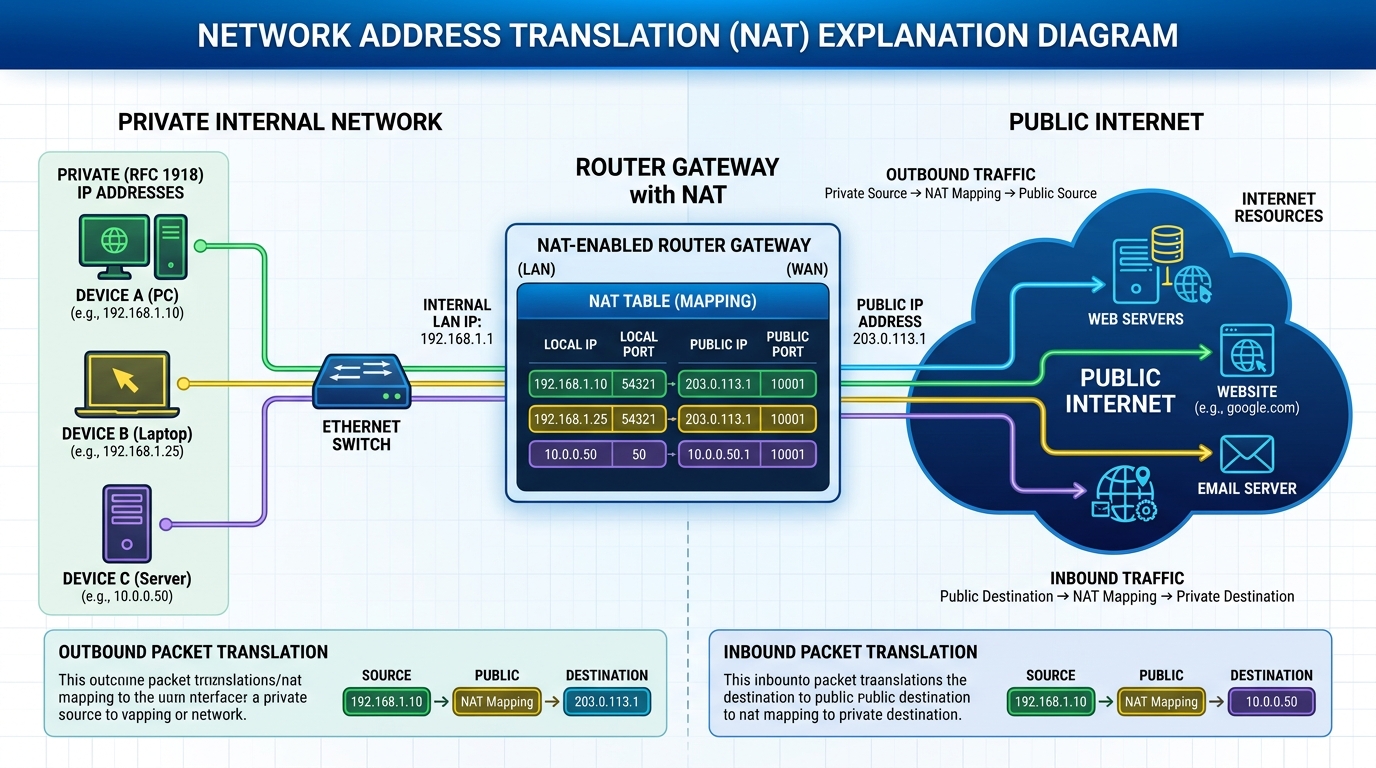
Summary: Network Address Translation (NAT) allows a single device, such as a router, to act as an agent between the Internet (or public network) and a local network (or private network), mapping multiple private IPs to one or more public IPs. This prevents IP depletion and adds an extra layer of security.
NAT is like the receptionist in a large office. Let's say you have left instructions with the receptionist not to forward any calls to you unless you request it. Later on, you call a potential client and leave a message for that client to call you back. You tell the receptionist that you are expecting a call from this client and to put her through.
The client calls the main number to your office, which is the only number the client knows. When the client tells the receptionist that she is looking for you, the receptionist checks a lookup table that matches your name with your extension. The receptionist knows that you requested this call, and therefore forwards the caller to your extension.
Developed by Cisco, Network Address Translation is used by a device (firewall, router or computer) that sits between an internal network and the rest of the world. NAT has many forms and can work in several ways:
- Static NAT - Mapping an unregistered IP address to a registered IP address on a one-to-one basis. Particularly useful when a device needs to be accessible from outside the network.
|
In static NAT, the computer with the IP address of 192.168.32.10 will always translate to 213.18.123.110. |
- Dynamic NAT - Maps an unregistered IP address to a registered IP address from a group of registered IP addresses.
|
In dynamic NAT, the computer with the IP address 192.168.32.10 will translate to the first available address in the range from 213.18.123.100 to 213.18.123.150. |
- Overloading - A form of dynamic NAT that maps multiple unregistered IP addresses to a single registered IP address by using different ports. This is known also as PAT (Port Address Translation), single address NAT or port-level multiplexed NAT.
|
In overloading, each computer on the private network is translated to the same IP address (213.18.123.100), but with a different port number assignment. |
- Overlapping - When the IP addresses used on your internal network are registered IP addresses in use on another network, the router must maintain a lookup table of these addresses so that it can intercept them and replace them with registered unique IP addresses. It is important to note that the NAT router must translate the "internal" addresses to registered unique addresses as well as translate the "external" registered addresses to addresses that are unique to the private network. This can be done either through static NAT or by implementing dynamic NAT.
|
The internal IP range (237.16.32.xx) is also a registered range used by another network. Therefore, the router is translating the addresses to avoid a potential conflict with another network. |
The internal network is usually a LAN (Local Area Network), commonly referred to as the stub domain. A stub domain is a LAN that uses IP addresses internally. Most of the network traffic in a stub domain is local, so it doesn't travel outside the internal network. A stub domain can include both registered and unregistered IP addresses. Of course, any computers that use unregistered IP addresses must use Network Address Translation to communicate with the rest of the world.
Dynamic NAT and Overloading
Here is how dynamic NAT works:
- An internal network (stub domain) has been set up with IP addresses that were not specifically allocated to that company by IANA (Internet Assigned Numbers Authority), the global authority that hands out IP addresses. These addresses should be considered non-routable since they are not unique.
- The company sets up a NAT-enabled router. The router has a range of unique IP addresses given to the company by IANA.
- A computer on the stub domain attempts to connect to a computer outside the network, such as a Web server.
- The router receives the packet from the computer on the stub domain.
- The router saves the computer's non-routable IP address to an address translation table. The router replaces the sending computer's non-routable IP address with the first available IP address out of the range of unique IP addresses. The translation table now has a mapping of the computer's non-routable IP address matched with the one of the unique IP addresses.
- When a packet comes back from the destination computer, the router checks the destination address on the packet. It then looks in the address translation table to see which computer on the stub domain the packet belongs to. It changes the destination address to the one saved in the address translation table and sends it to that computer. If it doesn't find a match in the table, it drops the packet.
- The computer receives the packet from the router. The process repeats as long as the computer is communicating with the external system.
Here is how overloading works:
- An internal network (stub domain) has been set up with non-routable IP addresses that were not specifically allocated to that company by IANA.
- The company sets up a NAT-enabled router. The router has a unique IP address given to the company by IANA.
- A computer on the stub domain attempts to connect to a computer outside the network, such as a Web server.
- The router receives the packet from the computer on the stub domain.
- The router saves the computer's non-routable IP address and port number to an address translation table. The router replaces the sending computer's non-routable IP address with the router's IP address. The router replaces the sending computer's source port with the port number that matches where the router saved the sending computer's address information in the address translation table. The translation table now has a mapping of the computer's non-routable IP address and port number along with the router's IP address.
- When a packet comes back from the destination computer, the router checks the destination port on the packet. It then looks in the address translation table to see which computer on the stub domain the packet belongs to. It changes the destination address and destination port to the ones saved in the address translation table and sends it to that computer.
- The computer receives the packet from the router. The process repeats as long as the computer is communicating with the external system.
- Since the NAT router now has the computer's source address and source port saved to the address translation table, it will continue to use that same port number for the duration of the connection. A timer is reset each time the router accesses an entry in the table. If the entry is not accessed again before the timer expires, the entry is removed from the table.
Stub Domains
Look at this table to see how the computers on a stub domain might appear to external networks.
| Source Computer |
Source Computer's IP Address |
Source Computer's Port |
NAT Router's IP Address |
NAT Router's Assigned Port Number |
|---|---|---|---|---|
| A | 192.168.32.10 | 400 | 215.37.32.203 | 1 |
| B | 192.168.32.13 | 50 | 215.37.32.203 | 2 |
| C | 192.168.32.15 | 3750 | 215.37.32.203 | 3 |
| D | 192.168.32.18 | 206 | 215.37.32.203 | 4 |
As you can see, the NAT router stores the IP address and port number of each computer in the address translation table. It then replaces the IP address with its own registered IP address and the port number corresponding to the location, in the table, of the entry for that packet's source computer. So any external network sees the NAT router's IP address and the port number assigned by the router as the source-computer information on each packet.
You can still have some computers on the stub domain that use dedicated IP addresses. You can create an access list of IP addresses that tells the router which computers on the network require NAT. All other IP addresses will pass through untranslated.
The number of simultaneous translations that a router will support are determined mainly by the amount of DRAM (Dynamic Random Access Memory) it has. But since a typical entry in the address-translation table only takes about 160 bytes, a router with 4 MB of DRAM could theoretically process 26,214 simultaneous translations, which is more than enough for most applications.
IANA has set aside specific ranges of IP addresses for use as non-routable, internal network addresses. These addresses are considered unregistered (for more information check out RFC 1918: Address Allocation for Private Internets, which defines these address ranges). No company or agency can claim ownership of unregistered addresses or use them on public computers. Routers are designed to discard (instead of forward) unregistered addresses. What this means is that a packet from a computer with an unregistered address could reach a registered destination computer, but the reply would be discarded by the first router it came to.
There is a range for each of the three classes of IP addresses used for networking:
- Range 1: Class A - 10.0.0.0 through 10.255.255.255
- Range 2: Class B - 172.16.0.0 through 172.31.255.255
- Range 3: Class C - 192.168.0.0 through 192.168.255.255
Although each range is in a different class, you are not required to use any particular range for your internal network. It is a good practice, though, because it greatly diminishes the chance of an IP address conflict.