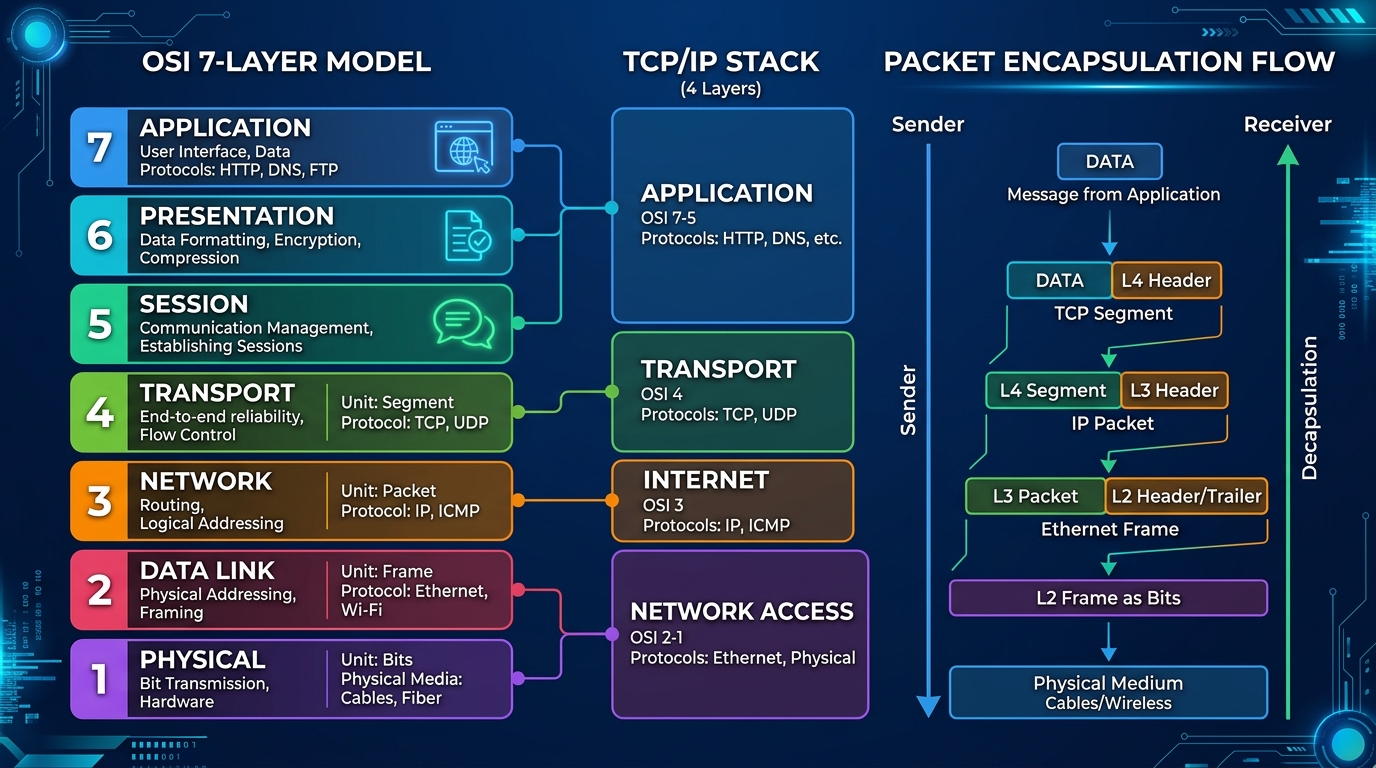
Networking basics form the foundation of any modern IT infrastructure. For businesses across Los Angeles and beyond, understanding how computers communicate, share resources, and secure data is crucial. A well-designed network ensures rapid information exchange, robust cybersecurity, and scalable growth.
Fundamental Components of a Network
Here are some of the critical parts of a network environment that power modern digital workspaces:
- Network - A network is a group of computers connected together in a way that allows information to be exchanged between the computers seamlessly.
- Node - A node is anything that is connected to the network. While a node is typically a computer, it can also be something like a printer, server, or IoT device.
- Segment - A segment is any portion of a network that is separated, by a switch, bridge or router, from other parts of the network to manage traffic load.
- Backbone - The backbone is the main cabling of a network that all of the segments connect to. Typically, the backbone is capable of carrying more information than the individual segments. For example, each segment may have a transfer rate of 1 Gigabit per second (Gbps), while the backbone may operate at 10 Gbps or higher.
- Topology - Topology is the way that each node is physically and logically connected to the network. Common topologies include Star, Mesh, and Ring setups.
- Local Area Network (LAN) - A LAN is a network of computers that are in the same general physical location, usually within a building or a campus. If the computers are far apart (such as across Los Angeles or in different cities), then a Wide Area Network (WAN) is typically used.
- Network Interface Card (NIC) - Every computer (and most other devices) is connected to a network through an NIC. In most desktop computers, this is an Ethernet card that is plugged into a slot on the computer's motherboard.
- Media Access Control (MAC) address - This is the physical address of any device -- such as the NIC in a computer -- on the network. The MAC address, which is made up of two equal parts, is 6 bytes long. The first 3 bytes identify the company that made the NIC. The second 3 bytes are the serial number of the NIC itself.
Network Transmission Types
Understanding how data packets are routed is essential for optimizing bandwidth and securing your internal network traffic.
- Unicast - A unicast is a transmission from one node addressed specifically to another node.
- Multicast - In a multicast, a node sends a packet addressed to a special group address. Devices that are interested in this group register to receive packets addressed to the group. An example might be a Cisco router sending out an update to all of the other Cisco routers.
- Broadcast - In a broadcast, a node sends out a packet that is intended for transmission to all other nodes on the network. Excessive broadcasts can lead to network congestion.
Optimizing Your Local Architecture and Security
Designing an efficient local area network requires more than just plugging in Ethernet cables. Whether you are setting up a small office LAN or a large enterprise WAN spanning multiple locations in Los Angeles, prioritizing secure configurations, redundant backbones, and intelligent routing protocols is essential. Implementing managed switches and enterprise-grade firewalls ensures that your local data flows without bottlenecks while remaining protected from external threats. A properly structured network topology not only improves everyday operational speeds but also significantly reduces downtime during hardware maintenance or unexpected outages.
Furthermore, network security is paramount in today's digital landscape. Modern businesses must integrate comprehensive security measures at every node. This involves configuring Virtual Local Area Networks (VLANs) to segregate sensitive departmental data, enforcing strict access control lists (ACLs) on routers, and maintaining up-to-date firmware on all network interface cards and switches. Regular security audits and continuous monitoring help identify unusual traffic patterns early, mitigating potential intrusions before they can access your core backbone. By treating your network architecture as a dynamic, evolving ecosystem, you empower your organization with the resilience and agility needed to thrive.
Frequently Asked Questions (FAQ)
What is a Local Area Network (LAN)?
A LAN is a network of computers located in the same physical area, such as a Los Angeles office building, designed for fast and secure local data exchange.
Why is network topology important for my business?
Network topology defines how nodes are connected. Choosing the right layout ensures optimal bandwidth distribution, easier troubleshooting, and greater scalability as your company grows.
What is the difference between a switch and a router?
A switch connects multiple devices on the same local network to share resources efficiently, while a router connects multiple networks together, such as linking your internal office LAN securely to the public internet.